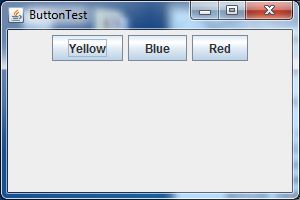
startup screen
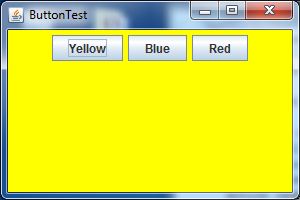
after pressing yellow button
ButtonTest.javaimport java.awt.*;
import java.awt.event.*;
import javax.swing.*;
/**
* @version 1.33 2007-06-12
* @author Cay Horstmann
*/
public class ButtonTest
{
public static void main(String[] args)
{
EventQueue.invokeLater(new Runnable()
{
public void run()
{
ButtonFrame frame = new ButtonFrame();
frame.setDefaultCloseOperation(JFrame.EXIT_ON_CLOSE);
frame.setVisible(true);
}
});
}
}
/**
* A frame with a button panel
*/
class ButtonFrame extends JFrame
{
public ButtonFrame()
{
setTitle("ButtonTest");
setSize(DEFAULT_WIDTH, DEFAULT_HEIGHT);
// create buttons
JButton yellowButton = new JButton("Yellow");
JButton blueButton = new JButton("Blue");
JButton redButton = new JButton("Red");
buttonPanel = new JPanel();
// add buttons to panel
buttonPanel.add(yellowButton);
buttonPanel.add(blueButton);
buttonPanel.add(redButton);
// add panel to frame
add(buttonPanel);
// create button actions
ColorAction yellowAction = new ColorAction(Color.YELLOW);
ColorAction blueAction = new ColorAction(Color.BLUE);
ColorAction redAction = new ColorAction(Color.RED);
// associate actions with buttons
yellowButton.addActionListener(yellowAction);
blueButton.addActionListener(blueAction);
redButton.addActionListener(redAction);
}
/**
* An action listener that sets the panel's background color.
*/
private class ColorAction implements ActionListener
{
public ColorAction(Color c)
{
backgroundColor = c;
}
public void actionPerformed(ActionEvent event)
{
buttonPanel.setBackground(backgroundColor);
}
private Color backgroundColor;
}
private JPanel buttonPanel;
public static final int DEFAULT_WIDTH = 300;
public static final int DEFAULT_HEIGHT = 200;
}
Maintained by John Loomis, updated Sun Sep 22 12:29:32 2013