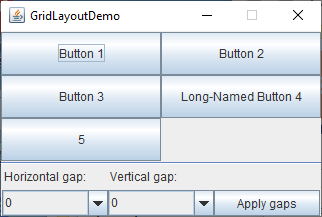

Reference: How to use GridLayout, Oracle Java tutorials
GridLayoutDemo.java/*
* GridLayoutDemo.java
*
*/
import java.awt.*;
import java.awt.event.*;
import javax.swing.*;
public class GridLayoutDemo extends JFrame {
static final String gapList[] = {"0", "10", "15", "20"};
final static int maxGap = 20;
JComboBox<String> horGapComboBox;
JComboBox<String> verGapComboBox;
JButton applyButton = new JButton("Apply gaps");
GridLayout experimentLayout = new GridLayout(0,2);
public GridLayoutDemo(String name) {
super(name);
setResizable(false);
}
public void initGaps() {
horGapComboBox = new JComboBox<String>(gapList);
verGapComboBox = new JComboBox<String>(gapList);
}
public void addComponentsToPane(final Container pane) {
initGaps();
final JPanel compsToExperiment = new JPanel();
compsToExperiment.setLayout(experimentLayout);
JPanel controls = new JPanel();
controls.setLayout(new GridLayout(2,3));
//Set up components preferred size
JButton b = new JButton("Just fake button");
Dimension buttonSize = b.getPreferredSize();
compsToExperiment.setPreferredSize(new Dimension((int)(buttonSize.getWidth() * 2.5)+maxGap,
(int)(buttonSize.getHeight() * 3.5)+maxGap * 2));
//Add buttons to experiment with Grid Layout
compsToExperiment.add(new JButton("Button 1"));
compsToExperiment.add(new JButton("Button 2"));
compsToExperiment.add(new JButton("Button 3"));
compsToExperiment.add(new JButton("Long-Named Button 4"));
compsToExperiment.add(new JButton("5"));
//Add controls to set up horizontal and vertical gaps
controls.add(new Label("Horizontal gap:"));
controls.add(new Label("Vertical gap:"));
controls.add(new Label(" "));
controls.add(horGapComboBox);
controls.add(verGapComboBox);
controls.add(applyButton);
//Process the Apply gaps button press
applyButton.addActionListener(new ActionListener(){
public void actionPerformed(ActionEvent e){
//Get the horizontal gap value
String horGap = (String)horGapComboBox.getSelectedItem();
//Get the vertical gap value
String verGap = (String)verGapComboBox.getSelectedItem();
//Set up the horizontal gap value
experimentLayout.setHgap(Integer.parseInt(horGap));
//Set up the vertical gap value
experimentLayout.setVgap(Integer.parseInt(verGap));
//Set up the layout of the buttons
experimentLayout.layoutContainer(compsToExperiment);
}
});
pane.add(compsToExperiment, BorderLayout.NORTH);
pane.add(new JSeparator(), BorderLayout.CENTER);
pane.add(controls, BorderLayout.SOUTH);
}
/**
* Create the GUI and show it. For thread safety,
* this method is invoked from the
* event dispatch thread.
*/
private static void createAndShowGUI() {
//Create and set up the window.
GridLayoutDemo frame = new GridLayoutDemo("GridLayoutDemo");
frame.setDefaultCloseOperation(JFrame.EXIT_ON_CLOSE);
//Set up the content pane.
frame.addComponentsToPane(frame.getContentPane());
//Display the window.
frame.pack();
frame.setVisible(true);
}
public static void main(String[] args) {
/* Use an appropriate Look and Feel */
try {
//UIManager.setLookAndFeel("com.sun.java.swing.plaf.windows.WindowsLookAndFeel");
UIManager.setLookAndFeel("javax.swing.plaf.metal.MetalLookAndFeel");
} catch (UnsupportedLookAndFeelException ex) {
ex.printStackTrace();
} catch (IllegalAccessException ex) {
ex.printStackTrace();
} catch (InstantiationException ex) {
ex.printStackTrace();
} catch (ClassNotFoundException ex) {
ex.printStackTrace();
}
/* Turn off metal's use of bold fonts */
UIManager.put("swing.boldMetal", Boolean.FALSE);
//Schedule a job for the event dispatch thread:
//creating and showing this application's GUI.
javax.swing.SwingUtilities.invokeLater(new Runnable() {
public void run() {
createAndShowGUI();
}
});
}
}
Maintained by John Loomis, updated Thu Mar 26 15:43:50 2020