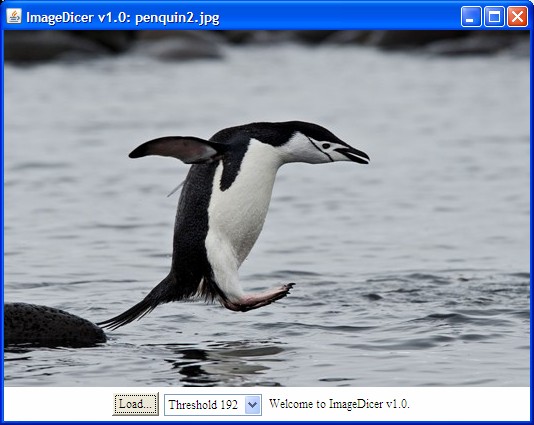
ImageDicer.java//Comment out the following package statement to compile separately.
//package com.javaworld.media.j2d;
/**
* ImageDicer provides a grab-bag of image processing operators.
* This version is compliant with Java 1.2 Beta 4, Aug 1998.
* Please refer to:
* http://www.javaworld.com/javaworld/jw-09-1998/jw-09-media.html
*
* @author Jonathan Knudsen <jonathan@oreilly.com>
* @author Bill Day <bill.day@javaworld.com>
* @version 1.0
* @see java.awt.image.BufferedImage
* @see java.awt.image.BufferedImageOp
* @see java.awt.image.ConvolveOp
* @see java.awt.image.LookupOp
* @see java.awt.image.ThresholdOp
**/
import java.awt.*;
import java.awt.event.*;
import java.awt.image.*;
import java.util.*;
public class ImageDicer
extends Frame {
/**
* Instantiates an ImageDicer with an image file name.
* If no image file name is specified on the command line,
* "default" is used.
**/
public static void main(String[] args) {
String fileName = "penquin2.jpg";
if (args.length > 0) fileName = args[0];
new ImageDicer(fileName);
}
/**
* kBanner holds the application title which is used
* in the window title.
**/
private static final String kBanner = "ImageDicer v1.0";
/**
* ImageDicer's constructor creates a set of image
* processing operations, creates user controls, and loads
* the named image.
**/
public ImageDicer(String fileName) {
super(kBanner);
createOps();
createUI();
loadImage(fileName);
setVisible(true);
}
/**
* A Hashtable member variable holds the image processing
* operations, keyed by their names.
**/
private Hashtable mOps;
/**
* The createOps() method creates the image processing
* operations discussed in the column.
**/
private void createOps() {
// Create a brand new Hashtable to hold the operations.
mOps = new Hashtable();
// Blurring
float ninth = 1.0f / 9.0f;
float[] blurKernel = {
ninth, ninth, ninth,
ninth, ninth, ninth,
ninth, ninth, ninth,
};
mOps.put("Blur", new ConvolveOp(
new Kernel(3, 3, blurKernel)));
// Edge detection
float[] edgeKernel = {
0.0f, -1.0f, 0.0f,
-1.0f, 4.0f, -1.0f,
0.0f, -1.0f, 0.0f
};
mOps.put("Edge detector", new ConvolveOp(
new Kernel(3, 3, edgeKernel)));
// Sharpening
float[] sharpKernel = {
0.0f, -1.0f, 0.0f,
-1.0f, 5.0f, -1.0f,
0.0f, -1.0f, 0.0f
};
mOps.put("Sharpen", new ConvolveOp(
new Kernel(3, 3, sharpKernel),
ConvolveOp.EDGE_NO_OP, null));
// Lookup table operations: posterizing and inversion.
short[] posterize = new short[256];
short[] invert = new short[256];
short[] straight = new short[256];
for (int i = 0; i < 256; i++) {
posterize[i] = (short)(i - (i % 32));
invert[i] = (short)(255 - i);
straight[i] = (short)i;
}
mOps.put("Posterize", new LookupOp(new ShortLookupTable(0, posterize),null));
mOps.put("Invert", new LookupOp(new ShortLookupTable(0, invert), null));
short[][] blueInvert = new short[][] { straight, straight, invert };
mOps.put("Invert blue", new LookupOp(new ShortLookupTable(0, blueInvert), null));
// Thresholding
mOps.put("Threshold 192", createThresholdOp(192, 0, 255));
mOps.put("Threshold 128", createThresholdOp(128, 0, 255));
mOps.put("Threshold 64", createThresholdOp(64, 0, 255));
}
/**
* createThresholdOp() uses a LookupOp to simulate a
* thresholding operation.
**/
private BufferedImageOp createThresholdOp(int threshold,
int minimum, int maximum) {
short[] thresholdArray = new short[256];
for (int i = 0; i < 256; i++) {
if (i < threshold)
thresholdArray[i] = (short)minimum;
else
thresholdArray[i] = (short)maximum;
}
return new LookupOp(new ShortLookupTable(0, thresholdArray), null);
}
/**
* A member variable, mControlPanel, keeps track of the panel
* that contains the user controls. This panel's size has to
* be accounted for later when we size the window to fit the
* image.
**/
private Panel mControlPanel;
/**
* createUI() creates the user controls and lays out the window.
* It also creates the event handlers (as inner classes) for
* the user controls.
**/
private void createUI() {
setFont(new Font("Serif", Font.PLAIN, 12));
// Use a BorderLayout. The image will occupy most of the window,
// with the user controls at the bottom.
setLayout(new BorderLayout());
// Use a Label to display status messages to the user.
final Label statusLabel = new Label("Welcome to " + kBanner + ".");
// Create a list of operations.
final Choice processChoice = new Choice();
Enumeration e = mOps.keys();
// Add all the operation names from the Hashtable.
while (e.hasMoreElements())
processChoice.add((String)e.nextElement());
// Add an event listener. This is where the image processing
// actually occurs.
processChoice.addItemListener(new ItemListener() {
public void itemStateChanged(ItemEvent ie) {
if (ie.getStateChange() != ItemEvent.SELECTED) return;
String key = processChoice.getSelectedItem();
statusLabel.setText("Working...");
BufferedImageOp op = (BufferedImageOp)mOps.get(key);
mBufferedImage = op.filter(mBufferedImage, null);
statusLabel.setText("");
repaint();
}
});
// Create a Button for loading a new image.
Button loadButton = new Button("Load...");
// Add a listener for the button. It pops up a file dialog
// and loads the selected image file.
loadButton.addActionListener(new ActionListener() {
public void actionPerformed(ActionEvent ae) {
FileDialog fd = new FileDialog(ImageDicer.this);
fd.setVisible(true);
if (fd.getFile() == null) return;
String path = fd.getDirectory() + fd.getFile();
loadImage(path);
}
});
// Add the user controls at the bottom of the window.
mControlPanel = new Panel();
mControlPanel.add(loadButton);
mControlPanel.add(processChoice);
mControlPanel.add(statusLabel);
add(mControlPanel, BorderLayout.SOUTH);
// Terminate the application if the user closes the window.
addWindowListener(new WindowAdapter() {
public void windowClosing(WindowEvent e) {
dispose();
System.exit(0);
}
});
}
/**
* When an image is loaded, the window is resized to
* accomodate the image size and the user controls.
**/
private void adjustToImageSize() {
if (!isDisplayable()) addNotify(); // Do this to get valid Insets.
Insets insets = getInsets();
int w = mBufferedImage.getWidth() + insets.left + insets.right;
int h = mBufferedImage.getHeight() + insets.top + insets.bottom;
h += mControlPanel.getPreferredSize().height;
setSize(w, h);
}
/**
* Center this window in the user's desktop.
**/
private void center() {
Dimension screen = Toolkit.getDefaultToolkit().getScreenSize();
Dimension d = getSize();
int x = (screen.width - d.width) / 2;
int y = (screen.height - d.height) / 2;
setLocation(x, y);
}
/**
* This member variable holds the currently displayed image.
**/
private BufferedImage mBufferedImage;
/**
* loadImage() loads an image, using a MediaTracker to
* ensure that the image data is fully loaded. Then it
* converts the image to a BufferedImage. Finally, it
* adjusts the window size and placement based on the
* new image size.
**/
private void loadImage(String fileName) {
// Use a MediaTracker to fully load the image.
Image image = Toolkit.getDefaultToolkit().getImage(fileName);
MediaTracker mt = new MediaTracker(this);
mt.addImage(image, 0);
try { mt.waitForID(0); }
catch (InterruptedException ie) { return; }
if (mt.isErrorID(0)) return;
// Make a BufferedImage from the Image.
mBufferedImage = new BufferedImage(
image.getWidth(null), image.getHeight(null),
BufferedImage.TYPE_INT_RGB);
Graphics2D g2 = mBufferedImage.createGraphics();
g2.drawImage(image, null, null);
adjustToImageSize();
center();
validate();
repaint();
setTitle(kBanner + ": " + fileName);
}
/**
* All paint() has to do is show the current image.
**/
public void paint(Graphics g) {
if (mBufferedImage == null) return;
Insets insets = getInsets();
g.drawImage(mBufferedImage, insets.left, insets.top, null);
}
}
Maintained by John Loomis, updated Thu Nov 29 12:44:22 2012