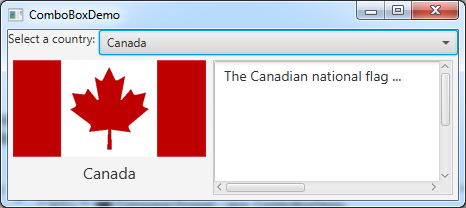
ComboBoxDemo.javaimport javafx.application.Application;
import javafx.stage.Stage;
import javafx.collections.FXCollections;
import javafx.collections.ObservableList;
import javafx.scene.Scene;
import javafx.scene.control.ComboBox;
import javafx.scene.control.Label;
import javafx.scene.image.ImageView;
import javafx.scene.layout.BorderPane;
public class ComboBoxDemo extends Application {
// Declare an array of Strings for flag titles
private String[] flagTitles = {"Canada", "China", "Denmark",
"France", "Germany", "India", "Norway", "United Kingdom",
"United States of America"};
// Declare an ImageView array for the national flags of 9 countries
private ImageView[] flagImage = {new ImageView("image/ca.gif"),
new ImageView("image/china.gif"),
new ImageView("image/denmark.gif"),
new ImageView("image/fr.gif"),
new ImageView("image/germany.gif"),
new ImageView("image/india.gif"),
new ImageView("image/norway.gif"),
new ImageView("image/uk.gif"), new ImageView("image/us.gif")};
// Declare an array of strings for flag descriptions
private String[] flagDescription = new String[9];
// Declare and create a description pane
private DescriptionPane descriptionPane = new DescriptionPane();
// Create a combo box for selecting countries
private ComboBox<String> cbo = new ComboBox<>(); // flagTitles
@Override // Override the start method in the Application class
public void start(Stage primaryStage) {
// Set text description
flagDescription[0] = "The Canadian national flag ...";
flagDescription[1] = "Description for China ... ";
flagDescription[2] = "Description for Denmark ... ";
flagDescription[3] = "Description for France ... ";
flagDescription[4] = "Description for Germany ... ";
flagDescription[5] = "Description for India ... ";
flagDescription[6] = "Description for Norway ... ";
flagDescription[7] = "Description for UK ... ";
flagDescription[8] = "Description for US ... ";
// Set the first country (Canada) for display
setDisplay(0);
// Add combo box and description pane to the border pane
BorderPane pane = new BorderPane();
BorderPane paneForComboBox = new BorderPane();
paneForComboBox.setLeft(new Label("Select a country: "));
paneForComboBox.setCenter(cbo);
pane.setTop(paneForComboBox);
cbo.setPrefWidth(400);
cbo.setValue("Canada");
ObservableList<String> items =
FXCollections.observableArrayList(flagTitles);
cbo.getItems().addAll(items);
pane.setCenter(descriptionPane);
// Display the selected country
cbo.setOnAction(e -> setDisplay(items.indexOf(cbo.getValue())));
// Create a scene and place it in the stage
Scene scene = new Scene(pane, 450, 170);
primaryStage.setTitle("ComboBoxDemo"); // Set the stage title
primaryStage.setScene(scene); // Place the scene in the stage
primaryStage.show(); // Display the stage
}
/** Set display information on the description pane */
public void setDisplay(int index) {
descriptionPane.setTitle(flagTitles[index]);
descriptionPane.setImageView(flagImage[index]);
descriptionPane.setDescription(flagDescription[index]);
}
/**
* The main method is only needed for the IDE with limited
* JavaFX support. Not needed for running from the command line.
*/
public static void main(String[] args) {
launch(args);
}
}
Maintained by John Loomis, updated Tue Mar 20 16:58:47 2018