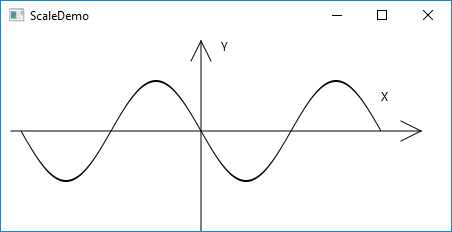
ScaleDemo.javaimport javafx.application.Application;
import javafx.scene.Scene;
import javafx.scene.layout.Pane;
import javafx.scene.shape.Line;
import javafx.scene.text.Text;
import javafx.scene.shape.Polyline;
import javafx.stage.Stage;
public class ScaleDemo extends Application {
@Override // Override the start method in the Application class
public void start(Stage primaryStage) {
// Create a polyline to draw a sine curve
Polyline polyline = new Polyline();
for (double angle = -360; angle <= 360; angle++) {
polyline.getPoints().addAll(
angle, Math.sin(Math.toRadians(angle)));
}
polyline.setTranslateY(100);
polyline.setTranslateX(200);
polyline.setScaleX(0.5);
polyline.setScaleY(50);
polyline.setStrokeWidth(1.0 / 25);
// Draw x-axis
Line line1 = new Line(10, 100, 420, 100);
Line line2 = new Line(420, 100, 400, 90);
Line line3 = new Line(420, 100, 400, 110);
// Draw y-axis
Line line4 = new Line(200, 10, 200, 200);
Line line5 = new Line(200, 10, 190, 30);
Line line6 = new Line(200, 10, 210, 30);
// Draw x, y axis labels
Text text1 = new Text(380, 70, "X");
Text text2 = new Text(220, 20, "Y");
// Add nodes to a pane
Pane pane = new Pane();
pane.getChildren().addAll(polyline, line1, line2, line3, line4,
line5, line6, text1, text2);
Scene scene = new Scene(pane, 450, 200);
primaryStage.setTitle("ScaleDemo"); // Set the window title
primaryStage.setScene(scene); // Place the scene in the window
primaryStage.show(); // Display the window
}
// Lauch the program from command-line
public static void main(String[] args) {
launch(args);
}
}
Maintained by John Loomis, updated Mon Mar 12 10:02:17 2018