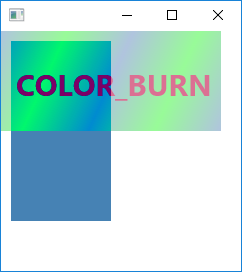
BlendBlendModeColorInputLinearGradient
Blend1.javaimport javafx.application.Application;
import javafx.scene.*;
import javafx.scene.effect.*;
import javafx.scene.paint.*;
import javafx.scene.shape.*;
import javafx.scene.text.*;
import javafx.stage.Stage;
public class Blend1 extends Application {
@Override
public void start(Stage stage) {
Blend blend = new Blend();
blend.setMode(BlendMode.COLOR_BURN);
ColorInput colorInput = new ColorInput();
colorInput.setPaint(Color.STEELBLUE);
colorInput.setX(10);
colorInput.setY(10);
colorInput.setWidth(100);
colorInput.setHeight(180);
blend.setTopInput(colorInput);
Rectangle rect = new Rectangle();
rect.setWidth(220);
rect.setHeight(100);
Stop[] stops = new Stop[]{new Stop(0, Color.LIGHTSTEELBLUE), new Stop(1, Color.PALEGREEN)};
LinearGradient lg = new LinearGradient(0, 0, 0.25, 0.25, true, CycleMethod.REFLECT, stops);
rect.setFill(lg);
Text text = new Text();
text.setX(15);
text.setY(65);
text.setFill(Color.PALEVIOLETRED);
text.setText("COLOR_BURN");
text.setFont(Font.font(null, FontWeight.BOLD, 30));
Group g = new Group();
g.setEffect(blend);
g.getChildren().addAll(rect, text);
stage.setScene(new Scene(g,240,240));
stage.show();
}
public static void main(String[] args) {
launch();
}
}
Maintained by John Loomis, updated Sun Mar 18 20:40:43 2018