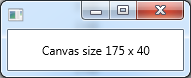
TextCanvas.javaimport javafx.application.Application;
import static javafx.application.Application.launch;
import javafx.geometry.VPos;
import javafx.scene.*;
import javafx.scene.canvas.*;
import javafx.scene.layout.StackPane;
import javafx.scene.text.TextAlignment;
import javafx.stage.Stage;
import javafx.scene.text.*;
public class TextCanvas extends Application {
@Override public void start(Stage primaryStage) {
Canvas canvas = new Canvas(175, 40);
GraphicsContext gc = canvas.getGraphicsContext2D();
gc.setTextAlign(TextAlignment.CENTER);
gc.setTextBaseline(VPos.CENTER);
double width = canvas.getWidth();
double height = canvas.getHeight();
String str;
str= String.format("Canvas size %d x %d",(int) width, (int) height);
gc.fillText(
str,
Math.round( width / 2),
Math.round(height / 2)
);
StackPane layout = new StackPane();
layout.getChildren().addAll(canvas);
Text text = new Text(10,10,str);
width = text.getLayoutBounds().getWidth();
height = text.getLayoutBounds().getHeight();
System.out.format("String width: %d\n",(int)width);
primaryStage.setScene(new Scene(layout));
primaryStage.show();
}
public static void main(String[] args) { launch(args); }
}
Maintained by John Loomis, updated Wed Jan 24 15:13:08 2018