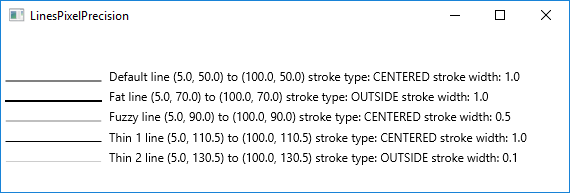
LinesPixelPrecision.javaimport javafx.application.Application;
import javafx.scene.Scene;
import javafx.scene.layout.Pane;
import javafx.scene.paint.Color;
import javafx.scene.shape.Line;
import javafx.scene.shape.StrokeType;
import javafx.scene.text.Text;
import javafx.stage.Stage;
/**
* A JavaFX Example of lines drawn showing pixels width
* when using fractional points and stroke widths.
* @author carldea
*/
public class LinesPixelPrecision extends Application {
/**
* @param args the command line arguments
*/
public static void main(String[] args) {
Application.launch(args);
}
@Override
public void start(Stage stage) {
stage.setTitle("LinesPixelPrecision ");
Pane root = new Pane();
Scene scene = new Scene(root, 800, 250, Color.WHITE);
double y = 50.0;
// draw a line using default values
Line defaultLine = createLine(5.0, y, 100, y, 1, null);
Text defaultLineText = createText(defaultLine, "Default");
y = 70;
Line fatLine = createLine(5.0, y, 100, y, 1, StrokeType.OUTSIDE);
Text fatLineText = createText(fatLine, "Fat");
y = 90;
Line fuzzyLine = createLine(5.0, y, 100, y, .5, null);
Text fuzzyLineText = createText(fuzzyLine, "Fuzzy");
y = 110.5;
Line thin1Line = createLine(5.0, y, 100, y, 1, null);
Text thin1LineText = createText(thin1Line, "Thin 1");
y = 130.5;
Pane subPane = new Pane();
Line thin2Line = createLine(5.0, y, 100, y, 0.10, StrokeType.OUTSIDE);
subPane.getChildren().add(thin2Line);
Text thin2LineText = createText(thin2Line, "Thin 2");
root.getChildren().addAll(defaultLine, defaultLineText);
root.getChildren().addAll(fatLine, fatLineText);
root.getChildren().addAll(fuzzyLine, fuzzyLineText);
root.getChildren().addAll(thin1Line, thin1LineText);
root.getChildren().addAll(subPane, thin2LineText);
stage.setScene(scene);
stage.show();
}
private Line createLine(double startX, double startY,
double endX, double endY,
double strokeWidth, StrokeType strokeType) {
Line line = new Line(startX, startY, endX, endY);
line.setStrokeWidth(strokeWidth);
if (strokeType != null) {
line.setStrokeType(strokeType);
}
line.setStroke(Color.BLACK);
return line;
}
private Text createText(Line line, String name) {
// label line (%s, %s) to (%s, %s) stroke type: %s
String displayString = String.format(" %s line (%s, %s) to (%s, %s) stroke type: %s stroke width: %s",
name,
line.getStartX(),
line.getStartY(),
line.getEndX(),
line.getEndY(),
line.getStrokeType().toString(),
line.getStrokeWidth());
Text text = new Text(displayString);
text.setX( line.getEndX() + 5);
text.setY( line.getEndY());
text.setFill(Color.BLACK);
return text;
}
}
Maintained by John Loomis, updated Fri Feb 09 13:09:36 2018