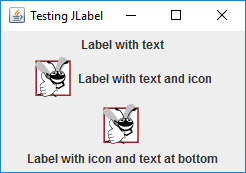
LabelTest.java// Fig. 12.7: LabelTest.java
// JLabels with text and icons.
import java.awt.FlowLayout; // specifies how components are arranged
import javax.swing.JFrame; // provides basic window features
import javax.swing.JLabel; // displays text and images
import javax.swing.SwingConstants; // common constants used with Swing
import javax.swing.Icon; // interface used to manipulate images
import javax.swing.ImageIcon; // loads images
class LabelFrame extends JFrame
{
private final JLabel label1; // JLabel with just text
private final JLabel label2; // JLabel constructed with text and icon
private final JLabel label3; // JLabel with added text and icon
// LabelFrame constructor adds JLabels to JFrame
public LabelFrame()
{
super("Testing JLabel");
setLayout(new FlowLayout()); // set frame layout
// JLabel constructor with a string argument
label1 = new JLabel("Label with text");
label1.setToolTipText("This is label1");
add(label1); // add label1 to JFrame
// JLabel constructor with string, Icon and alignment arguments
Icon bug = new ImageIcon(getClass().getResource("bug1.png"));
label2 = new JLabel("Label with text and icon", bug,
SwingConstants.LEFT);
label2.setToolTipText("This is label2");
add(label2); // add label2 to JFrame
label3 = new JLabel(); // JLabel constructor no arguments
label3.setText("Label with icon and text at bottom");
label3.setIcon(bug); // add icon to JLabel
label3.setHorizontalTextPosition(SwingConstants.CENTER);
label3.setVerticalTextPosition(SwingConstants.BOTTOM);
label3.setToolTipText("This is label3");
add(label3); // add label3 to JFrame
}
} // end class LabelFrame
public class LabelTest
{
public static void main(String[] args)
{
LabelFrame labelFrame = new LabelFrame();
labelFrame.setDefaultCloseOperation(JFrame.EXIT_ON_CLOSE);
labelFrame.setSize(260, 180);
labelFrame.setVisible(true);
}
} // end class LabelTest
Maintained by John Loomis, updated Thu Feb 09 11:39:20 2017