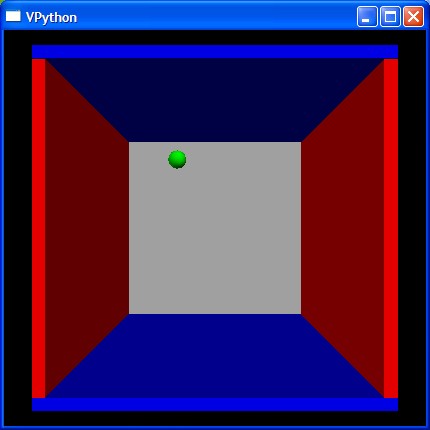
bounce2.py
01: from visual import *
02:
03: print """
04: Right button drag to rotate "camera" to view scene.
05: Middle button to drag up or down to zoom in or out.
06:   On a two-button mouse, middle is left + right.
07:   On a one-button mouse, middle is CTRL + mouse.
08: """
09:
10: side = 4.0
11: thk = 0.3
12: s2 = 2*side - thk
13: s3 = 2*side + thk
14: wallR = box (pos=( side, 0, 0), length=thk, height=s2,  width=s3,  color = color.red)
15: wallL = box (pos=(-side, 0, 0), length=thk, height=s2,  width=s3,  color = color.red)
16: wallB = box (pos=(0, -side, 0), length=s3,  height=thk, width=s3,  color = color.blue)
17: wallT = box (pos=(0,  side, 0), length=s3,  height=thk, width=s3,  color = color.blue)
18: wallBK = box(pos=(0, 0, -side), length=s2,  height=s2,  width=thk, color = (0.7,0.7,0.7))
19:
20: ball = sphere (color = color.green, radius = 0.4)
21: ball.mass = 1.0
22: ball.p = vector (-0.15, -0.23, +0.27)
23:
24: side = side - thk*0.5 - ball.radius
25:
26: dt = 0.5
27: t=0.0
28: while 1:
29:   rate(100)
30:   t = t + dt
31:   ball.pos = ball.pos + (ball.p/ball.mass)*dt
32:   if not (side > ball.x > -side):
33:     ball.p.x = -ball.p.x
34:   if not (side > ball.y > -side):
35:     ball.p.y = -ball.p.y
36:   if not (side > ball.z > -side):
37:     ball.p.z = -ball.p.z